Introduction: camera or screen, and why it matters
Where to look during a video interview, the camera or the screen, is one of those small details that quietly shapes how confident, present, and trustworthy you appear. In a behavioral interview, your content matters most, but your eye contact and presence influence whether the interviewer feels connected to you while you deliver that content.
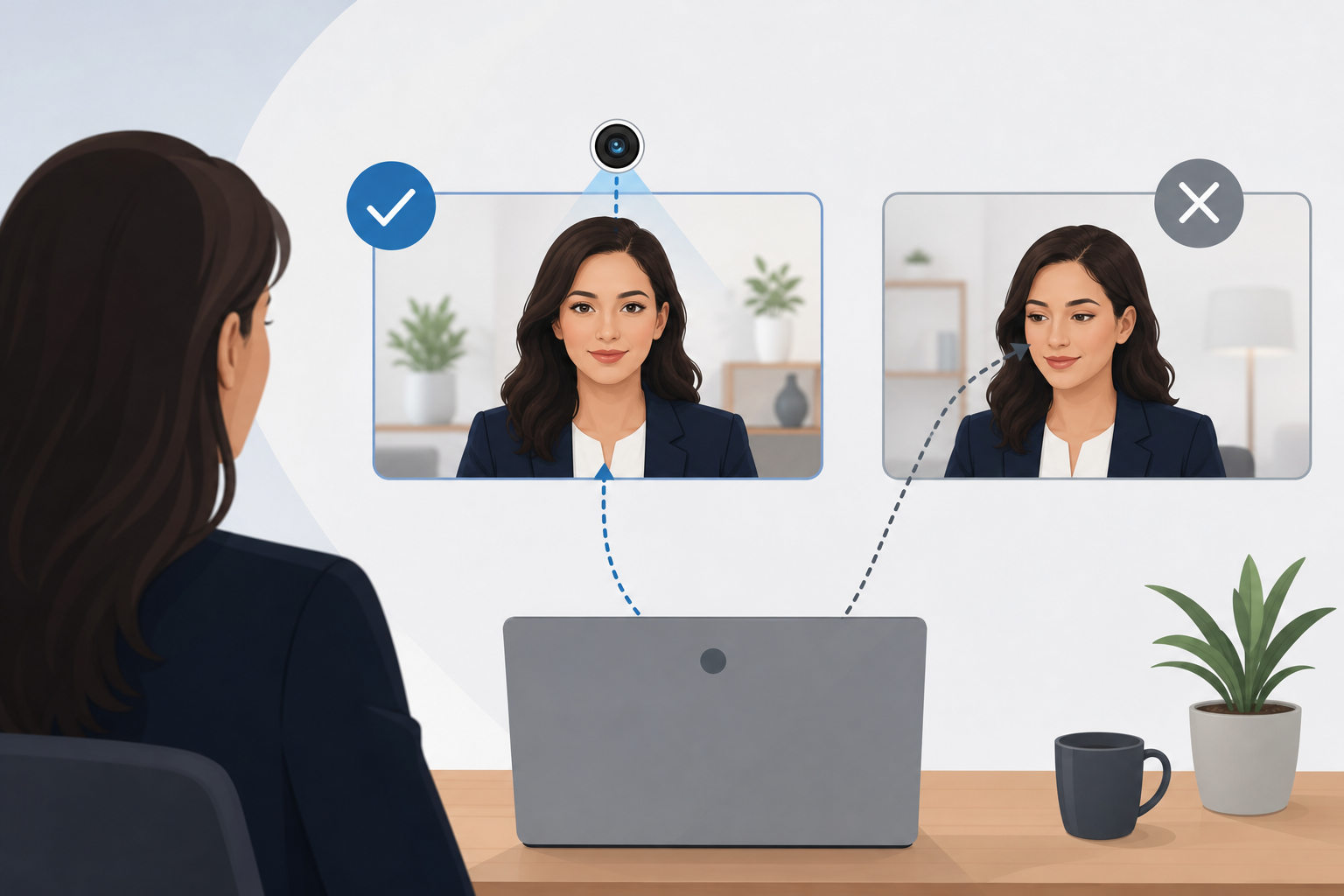
The problem is that video calls force a tradeoff. If you look at the interviewer’s face on your screen, you can read reactions and listen well, but you appear to be looking slightly downward or off to the side. If you look into the camera, you create “true” eye contact, but you lose some visual feedback and may feel less natural.
This article gives you a concrete, easy-to-remember pattern you can apply immediately: camera while speaking, screen while listening. You will also get a sticky-note hack, plus practical drills and STAR method examples tailored to job seekers preparing for behavioral interviews.
The eye-contact tradeoff in a video interview
In an in-person interview, eye contact is simple. You look at the person, and they feel seen. In a video interview, the camera and the person’s face are not in the same place, so you cannot do both perfectly at once.
Here is what each option signals.
Looking at the camera: stronger presence, less feedback
When you look at the camera, the interviewer experiences it as direct eye contact. This tends to communicate:
- Confidence and clarity
- Leadership presence
- Comfort with high-stakes communication
The downside is that you cannot easily see micro-reactions. If you are someone who calibrates your pacing based on facial cues, you may feel like you are speaking into a void.
Looking at the screen: better listening, weaker “eye contact”
When you look at the interviewer on the screen, you get:
- Better listening and empathy, because you are focused on the person
- Better ability to read confusion, agreement, or interest
- A more natural conversational rhythm
The downside is that your gaze often appears slightly downward or off-center, especially if your camera is above your screen. This can unintentionally come across as distracted, uncertain, or less engaged, even when you are fully engaged.
Important note: You do not need unbroken camera-eye contact to do well. You need a repeatable pattern that creates connection while still letting you listen and think.
The best default pattern: camera while speaking, screen while listening
If you want one rule that works across most roles, seniority levels, and interview styles, use this:
- While speaking: look at the camera for your key points.
- While listening: look at the screen so you can read the interviewer and respond naturally.
This pattern solves the core problem. You create “eye contact” at the exact moment you are delivering your message, and you switch to the screen when the interviewer is talking so you can listen deeply.
Why this pattern works in behavioral interviews
Behavioral interviews reward structured storytelling. Your interviewer is evaluating how you:
- Explain context quickly
- Choose relevant details
- Communicate decisions and tradeoffs
- Reflect on outcomes and learning
Looking into the camera during your Situation, Task, Action, Result delivery makes your story feel directed and intentional. Looking at the screen while listening helps you catch follow-up cues like “tell me more about your role” or “what would you do differently,” which often determine whether a good answer becomes a great one.
Exactly how to do it: a simple timing script
Use this timing as your baseline. It keeps you from overthinking.
- Question asked (listening): eyes on the screen.
- Pause to think (still listening mode): eyes briefly down to notes if needed, then back to the screen.
- Start speaking (connection moment): shift eyes to the camera for your opening sentence.
- Deliver key points (speaking): stay mostly on the camera, especially for your main actions and results.
- Natural glance (monitoring): quick check back to the screen once or twice to read reactions.
- Finish strong (closing line): return to the camera for your final sentence.
If you tend to ramble, the camera focus also helps you stay crisp. It creates a subtle sense of “presenting,” which encourages structure.
The sticky-note hack: train your eyes without feeling robotic
The fastest way to improve where you look during a video interview is to make the camera impossible to ignore.
The setup
- Place a small sticky note next to your webcam, as close to the lens as possible.
- Write one short cue in thick marker, such as:
- LOOK HERE
- CAMERA
- SLOW DOWN
- STAR
If your camera is centered at the top of your laptop screen, put the sticky note right under it. If you use an external webcam, put the note on the monitor bezel adjacent to the lens.
How to use it during the interview
- When you start answering, let your eyes “land” on the sticky note area. That naturally aligns you with the camera.
- When you are listening, ignore the sticky note and look at the interviewer’s face on screen.
Why it works
You are not trying to force continuous camera contact. You are creating a visual anchor that makes it easy to return to the camera at the moments that matter.
Keep the note small. You want a cue, not a distraction.
Common scenarios and where to look in each
Scenario 1: The interviewer asks a multi-part question
Example: “Tell me about a time you disagreed with a stakeholder. How did you handle it, and what was the outcome?”
What to do:
- Look at the screen as they ask it.
- Repeat the question back briefly while looking at the camera: “Sure. I will walk through the disagreement, what I did, and the outcome.”
- Then deliver your STAR answer mostly to the camera.
This reassures them you heard all parts and signals structure immediately.
Scenario 2: You need a few seconds to think
Silence feels bigger on video. Your gaze can make it feel either thoughtful or awkward.
What to do:
- Keep your eyes on the screen and say: “Let me take a second to think.”
- Brief glance down if you need to recall details.
- Return to the camera when you begin speaking.
This reads as composed, not frozen.
Scenario 3: The interviewer is taking notes or looking away
Sometimes the interviewer looks down to type. If you chase their gaze on screen, you may look like you are checking something off-screen.
What to do:
- Continue looking at the camera while you speak.
- If you ask a question and want confirmation, shift to the screen to catch their response.
Scenario 4: Panel or two interviewers on one call
If you have two faces on-screen, you might bounce your eyes around.
What to do:
- While listening to a specific person, look at them on the screen.
- While answering, look mostly at the camera.
- When you reference someone directly, glance at their tile briefly: “As you mentioned, Alex…” then return to the camera.
This keeps you steady and avoids a jittery presence.
STAR examples with “where to look” cues
Use these to practice. The goal is to pair structure with intentional eye contact.
Example 1: Handling conflict with a stakeholder
Situation: “In my last role, a sales lead wanted us to promise a feature in a timeline engineering could not support.”
Task: “I needed to protect delivery credibility while keeping sales aligned and moving the deal forward.”
Action: “I scheduled a short meeting with sales and engineering, clarified what was feasible, and proposed a phased commitment. I also wrote a follow-up summary with exact language sales could use with the customer.”
Result: “We kept the customer engaged, avoided an unrealistic promise, and delivered the first phase on time. Sales later reused the same approach for other deals.”
Where to look while practicing:
- Situation and Task: start on the camera.
- Action: stay on the camera for your decisions and steps.
- Result: look at the camera for the final line.
- After finishing: shift to the screen and pause for follow-up.
Example 2: Learning from a mistake
Situation: “I once shipped a report with an incorrect filter, which caused a team to make decisions off incomplete data for a day.”
Task: “I needed to correct the issue quickly, communicate clearly, and prevent recurrence.”
Action: “I fixed the filter, messaged impacted stakeholders with what changed, and added a validation check to our reporting template. I also documented the failure mode in our team wiki.”
Result: “The team had corrected data the same day, and we reduced repeat errors by standardizing the validation step.”
Where to look while practicing:
- When you say “I once shipped a report with an incorrect filter,” glance at the screen briefly to read reaction, then return to the camera for ownership and learning.
Practical setup tips that make eye contact easier
Where you look is easier when your camera and content are aligned.
Raise your camera to eye level
If your laptop is low, you will look down even when you are trying to look “forward.” Stack a few books under your laptop or use a stand. Eye level reduces the need to think about gaze at all.
Put the interviewer close to the camera
Move the video window as close to your webcam as possible. If you use a large monitor, shrink and drag the interviewer’s tile to the top center near the camera.
Use speaker view when possible
Speaker view keeps the active person larger and easier to focus on. It reduces eye darting across a grid.
Keep notes minimal and positioned near the camera
If you read notes from a second screen or far below the camera, it is obvious. Instead:
- Use 3 to 5 bullets total
- Place them near the top of your screen
- Use keywords, not sentences
If you want a quick way to pressure-test your overall readiness for interviews, you can also review company-specific interview patterns and candidate experiences at https://primly.io/community.
Mistakes that quietly hurt your presence
Staring at the camera the entire time
Constant camera staring can feel intense and unnatural. It can also reduce your listening quality. Use the pattern instead: camera while speaking, screen while listening.
Looking at your own image
Many platforms show your self-view. It is distracting and can make you look like you are checking yourself.
Fix:
- Hide self-view if the platform allows it.
- If not, drag your self-view away from the interviewer’s tile so your gaze does not drift.
Looking off-screen to think
Looking far to the side can suggest you are reading something or multitasking.
Fix:
- Say you are taking a second to think.
- Brief glance down is usually less suspicious than a long side glance.
Reading your answer
Reading breaks connection and often flattens your tone.
Fix:
- Memorize structure, not script.
- Practice your STAR stories until you can deliver them in different words each time.
A 10-minute practice routine you can do today
You will improve faster by practicing gaze and structure together.
- Set your camera to eye level and place the sticky note by the lens.
- Pick two STAR stories you expect in behavioral interviews: conflict, ownership, failure, leadership, ambiguity.
- Record yourself answering one question for each story.
- Review the recording and check:
- Did you look at the camera on your opening and closing lines?
- Did you return to the screen when listening?
- Did your eyes dart to notes too often?
- Repeat once, focusing only on smoother transitions between camera and screen.
You are not aiming for perfection. You are aiming for a calm, consistent presence.
Conclusion: use a pattern, not perfection
In a video interview, you cannot perfectly replicate in-person eye contact. What you can do is adopt a simple pattern that consistently creates connection. Look at the camera while speaking, and look at the screen while listening. Add the sticky-note anchor near your webcam, move the interviewer window close to the lens, and practice your STAR stories with this rhythm.
When you combine clear behavioral interview structure with intentional gaze, you come across as more confident, more engaged, and easier to trust. That is exactly the impression you want when the interviewer is deciding whether they can picture working with you.